![qumulex_logo_full_color.svg]](https://www.qumulex.com/hubfs/qumulex_logo_full_color.svg)
Qumulex allows for bulk importing cardholders within the Person tab.
The first step is to create or format a .csv file for the import. To ensure this works properly, please use the attached .csv file and fill in the relevant columns. Then save this as a .csv file. Do not delete unused columns; simply leave them blank.
Template at the following link: QumulexBulkImportTemplate
Note:
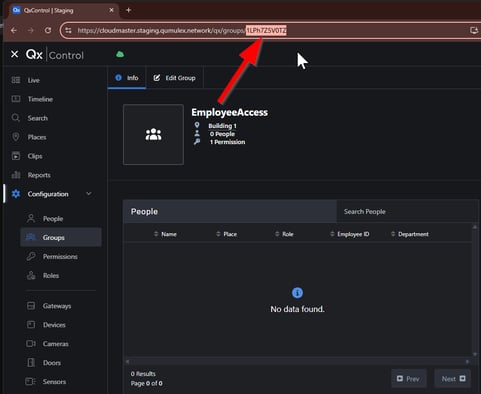
Most of the columns are intuitive, but the last column is GroupID. This is used if you wish the Person record to be added to a specific already existing Group in Qumulex. It requires the GroupID. To get the Group ID perform the following:
- Browse to Groups
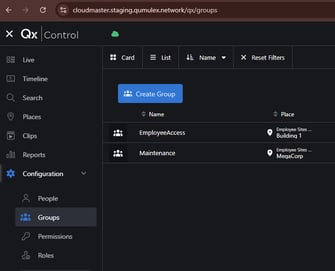
- Click on the group you wish them to be added to. In the URL at the top of the browser there will be an ID number trailing the address. Copy that exactly as it is and paste it into the spreadsheet. (Example Below)
Once you have the .csv saved
Make sure you have adjusted your Scope within the QxControl software to ensure that you are at the Customer level for the proper customer. For more information on Scope, see the following article: https://www.qumulex.com/kb/setting-your-scope
Go to People and select Import Cardholders. Then select your file from the local machine.
It is HIGHLY recommended to do a trial import with 2 or 3 cardholders before doing a large import for validation.