![qumulex_logo_full_color.svg]](https://www.qumulex.com/hubfs/qumulex_logo_full_color.svg)
When a Clip is saved in QxControl, the backend Clips service copies the video footage recorded either on the gateway's hard drives on in cloud storage buckets and packages it into an MP4 file which is stored in a dedicated, secure cloud storage location until it reaches its expiration time. There is no access to this MP4 file to modify it's contents while it is in the cloud.
If the MP4 file is downloaded via the QxControl UI, this file becomes accessible to all manner of video editing tools that could modify its contents. You can verify the integrity of a downloaded version of your clip by comparing the MD5 hash (https://en.wikipedia.org/wiki/MD5) of the downloaded file against that of the MP4 file in the cloud.
First, obtain the MD5 hash of the cloud clip. To do this, press download on the Clip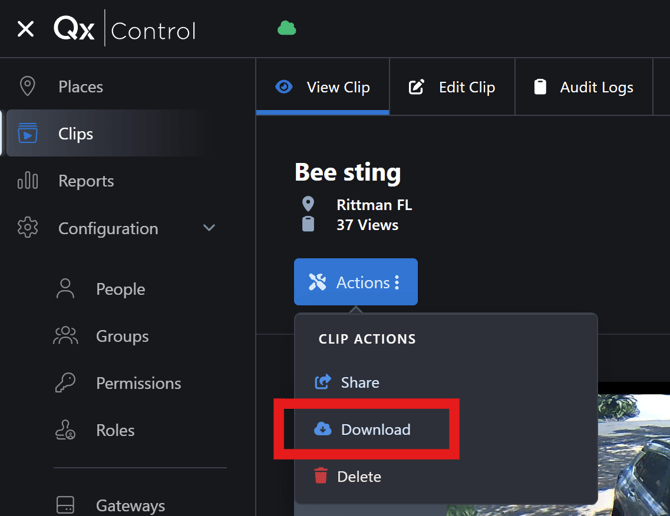
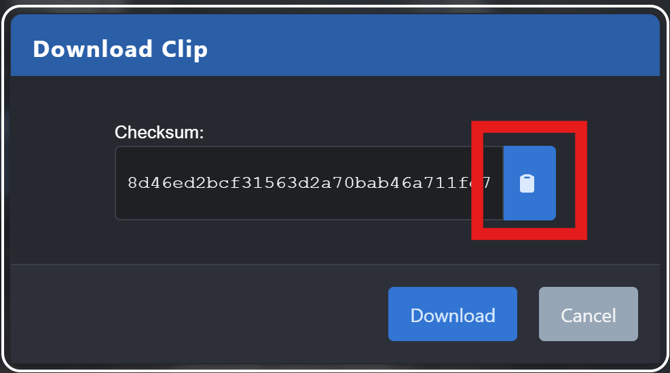
You will be shown a dialog that contains the MD5 hash. Press the clipboard icon to copy the hash value.
Next, go to an online MD5 calculator, e.g. https://md5file.com/calculator and compute the hash for the file you want to verify. If the hash values match, the downloaded MP4 file has not been modified since the clip was generated.