![qumulex_logo_full_color.svg]](https://www.qumulex.com/hubfs/qumulex_logo_full_color.svg)
Version: Rev 1.4 | Created: January 2, 2026
This article explains how a Qumulex Gateway communicates with your devices and the Qumulex cloud, and which network endpoints and ports it needs. Share it with the site's IT team before installation.
Operational Mode
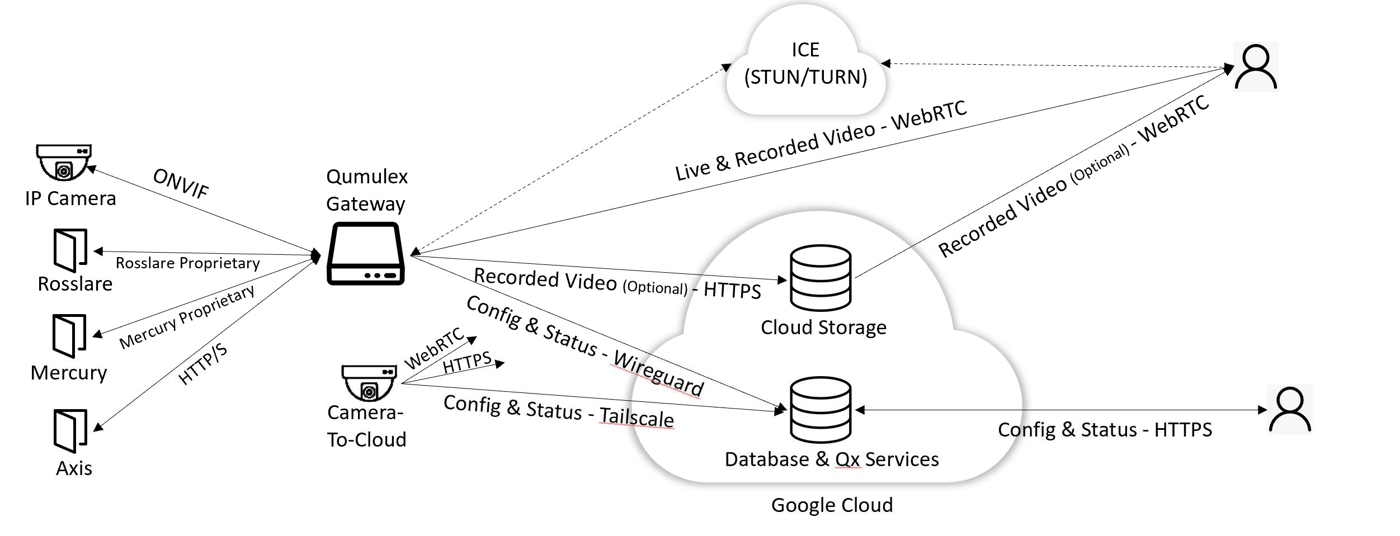
QxControl Operational Communications Architecture
Device Communication
Your Gateway communicates with security devices on your premises (ex. cameras, door controllers) over an IP network. Qumulex Gateways have at least two network interfaces. We highly recommend using one interface as a private network for your security devices. Keeping them isolated reduces exposure to vulnerabilities, and the Gateway acts as a firewall between those devices and the larger corporate network or internet.
Cloud Communication
Because QxControl is a cloud-enabled service, the Gateway communicates with several cloud-based services:
- Configuration and Status (Gateway) – The Gateway receives its configuration from the Qumulex cloud and sends status and events back to it. Users normally send and receive configuration and status through the Qumulex cloud, not directly to the Gateway.
- These messages travel over a secure WireGuard VPN, which is built into the Gateway's Linux kernel.
- On boot, the Gateway opens a UDP connection to wireguard.qumulex.io on port 51820.
- WireGuard encrypts the data, but doesn't hide the underlying network protocols. Ports and addresses of Qumulex cloud services may be visible through packet inspection, but they are secure and shouldn't require extra firewall changes.
- Configuration and Status (Camera-to-Cloud) – Camera-to-cloud works much like Gateway mode. Because WireGuard isn't available in the camera's kernel, it uses Tailscale, a different implementation of the WireGuard protocol, to connect each camera to a Qumulex cloud endpoint.
- From the camera, QxControl finds the Qumulex Tailscale endpoint using STUN, reaching out to ICE servers at *.tailscale.com over UDP port 3478.
- QxControl on the camera then opens an outbound UDP connection on port 41641 to the Qumulex Tailscale endpoint.
- Video recorded to the cloud – Video from cameras with a cloud recording subscription is queued on the Gateway. As bandwidth allows, and following any upload schedules you set, it is sent over HTTPS to upload-production.qumulex.io.
- Video transfer – Live and recorded video is sent on demand from the Gateway to the user's browser using WebRTC.
- WebRTC uses Interactive Connectivity Establishment (ICE), with STUN and TURN servers, to try to set up a direct peer-to-peer connection between the Gateway and the browser. The Gateway connects to the ICE server (normally coturn.qumulex.io), then makes an outbound UDP connection to an address and port the ICE server provides.
- Depending on the network between the Gateway and the browser, WebRTC may fall back to a relayed connection. A direct peer connection is usually faster with lower latency. A router with full-cone NAT at the Gateway site is preferred.
- DNS – If the QxControl cloud can't be reached (ex. an internet outage), users may need to connect directly to the Gateway with the QxControl web app. This must use secure HTTPS, so Qumulex keeps a DNS record of the Gateway's public and private IP addresses. The Gateway finds its address by calling checkip.amazonaws.com, and the addresses are then updated with our DNS provider.
Maintenance Mode
Qumulex automatically keeps your Gateway's software up to date, so you have the latest security fixes and features. Make sure the Gateway's network doesn't block these updates:
- Software updates are downloaded from Google Container Registry and Google Artifact Registry. The Gateway must be able to connect to and download from us-docker.pkg.dev, gcr.io and us-central1-docker.pkg.dev on port 443.
- Gateway software updates cannot go through an HTTPS proxy that uses a custom trust store (HTTPS interception). The US Cybersecurity and Infrastructure Security Agency has noted that HTTPS interception weakens TLS security.
- Qumulex tests and installs security updates for the Gateway's operating system (Ubuntu Server). The Gateway needs access to the Ubuntu package repository at archive.ubuntu.com/ubuntu/.
- Our software continues to improve, and future versions may connect to new services. For the best experience, avoid non-standard HTTP blocking and content filtering.
Summary of Endpoints and Ports
| End Point | Port | Protocol | Direction |
|---|---|---|---|
| wireguard.qumulex.io | 51820 | UDP (WireGuard) | Outbound |
| *.tailscale.com (camera-to-cloud) | 443 | TCP | Outbound |
| Qumulex Tailscale endpoint (camera-to-cloud) | 41641 | UDP (WireGuard) | Outbound |
| coturn.qumulex.io | 3478 | UDP (STUN/TURN) | Outbound |
| WebRTC peer | — | UDP | Bi-directional |
| upload-production.qumulex.io | 443 | HTTPS | Outbound |
| checkip.amazonaws.com | 80 | HTTP | Outbound |
| us-docker.pkg.dev | 443 | HTTPS | Outbound |
| gcr.io | 443 | HTTPS | Outbound |
| us-central1-docker.pkg.dev | 443 | HTTPS | Outbound |
| archive.ubuntu.com/ubuntu/ | 80 | HTTP | Outbound |